2026 Undated Digital Planner KDP
The shift toward digital planning has reshaped how people organize their time, goals, and daily routines. For creators, entrepreneurs, and designers looking to offer something both flexible and polished, the 2026 Undated Digital Planner KDP presents a smart opportunity. This isn't just a calendar or a set of templates. It is a fully customizable tool that gives users the freedom to shape their planning experience without being locked into pre-set dates or rigid layouts. Whether you are building a product for yourself or preparing a high-quality interior for Kindle Direct Publishing, understanding what makes this planner stand out can help you use it with purpose.
What Makes This Planner Different
Unlike traditional dated planners, the undated format removes the pressure of starting on January 1 or sticking to a fixed timeline. Users begin whenever they want, skip months if needed, and return to pages without guilt. This alone makes the 2026 Undated Digital Planner KDP interesting for people whose lives don't fit neatly into a January-to-December structure. The fact that every template is fully editable on Canva adds another layer of usefulness. You are not stuck with someone else's font choice or color palette. You can adjust fonts, sizes, colors, layout style, and even insert your own photos. That level of control appeals to anyone who values branding, personal expression, or simply a clean look that matches their workflow.
For publishers and content creators, the editable Canva link is a game changer. You can customize the entire interior based on your specific requirements before exporting. This means you can create multiple variations from a single base design, tailoring each one for different audiences or niches without starting from scratch each time.
Core Features That Support Real Productivity
A planner is only as good as the tools it provides. This interior includes a thoughtful selection of pages that cover the essentials without overwhelming the user. The specification list speaks to both structure and simplicity:
- Belongs To page for personalization
- Editable files across formats
- 2026 calendar reference
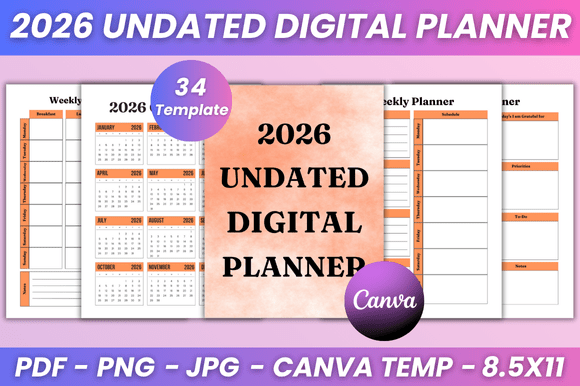
- Monthly planner from January to December
- Daily planner pages
- Weekly planner spreads
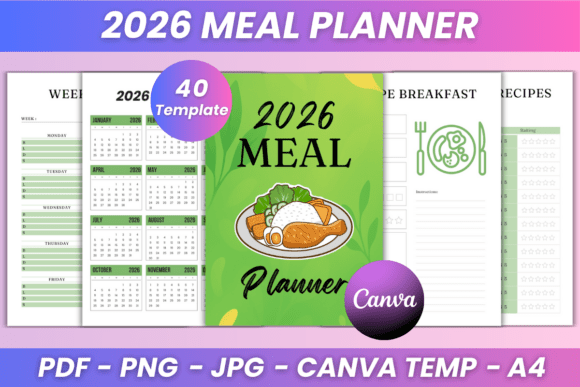
- Weekly meal planner
- To-do list pages
- Notes section spanning 2 pages
- Thank You page
With 34 pages in total, the planner hits a sweet spot. It is comprehensive enough to support consistent use but compact enough to avoid feeling bloated. The clean and minimal design means users can focus on what matters without visual clutter. The inclusion of high-quality print-ready PDF files, along with JPG and PNG formats, ensures flexibility whether someone plans to use the planner on a tablet, print it at home, or incorporate pages into a digital journaling app.
Who Benefits Most From This Planner
Different users will find different value points. Understanding these perspectives can help you position the product more effectively or personalize your own version.
Designers and Creative Professionals
If you are a designer looking for a base template to offer clients, this planner gives you a solid foundation. You can rebrand it, adjust the layout style, and deliver a unique product without building every page from scratch. The editable Canva link means you can collaborate with clients, let them tweak colors themselves, or simply use the files as a starting point for a larger brand package.
Marketers and Bloggers
For those who create content around productivity, goal setting, or slow living, this planner can become a lead magnet or a product in itself. You can customize it to match your blog's aesthetic, add your own branding, and offer it as a free download or a paid resource. Because it is undated, you can sell it year-round without worrying about seasonal relevance.
Freelancers and Small Business Owners
Running a business means juggling multiple calendars, client deadlines, and personal tasks. The weekly and daily planner pages help you break down big projects into manageable steps. The meal planner might seem like a small addition, but for someone managing a home office, it reduces decision fatigue. Having one system for both work and life planning often leads to better consistency.
Educators and Hobbyists
Teachers, course creators, and lifelong learners can use the planner to track lesson plans, reading goals, or creative projects. The undated nature means you can start a new module or hobby season whenever you are ready. The to-do list and notes pages become especially useful when planning curriculum or mapping out learning milestones.
Creative Ways to Customize and Use the Templates
Because every template is editable, the possibilities go far beyond simply filling in dates. Here are a few practical approaches you can take when working with this interior.
Brand a themed planner. If you have a specific niche audience, tailor the color palette and fonts to match that community. A minimalist black-and-white version works for bullet journal enthusiasts, while a soft pastel palette appeals to those drawn to gentle aesthetics. You can even add subtle background textures or watermarks without overpowering the functionality.
Create a hybrid digital-print system. Use the PNG files for digital planning on apps like GoodNotes or Notability, then print specific pages like the weekly meal planner or to-do list for your fridge or desk. The JPG and PDF formats make it easy to move between devices and paper without compatibility issues.
Bundle with other resources. Combine the planner with a separate goal-setting guide, a habit tracker, or a finance log. Because the base design is clean and minimal, it pairs well with other themed inserts without clashing visually.
Offer personalized versions. If you sell on Etsy or Gumroad, you can customize the Belongs To page and a few interior details for each customer. This adds perceived value without requiring hours of extra design work. The editable Canva link makes this scalable.
Practical Tips for Keeping Your Planner Clear and Effective
Even with a great design, a planner fails if it feels chaotic or hard to navigate. Here is how to maintain clarity and usefulness whether you are designing for yourself or for buyers.
Use hierarchy consistently. Keep your headings, dates, and task lines visually distinct. If you change fonts, make sure the body text remains readable. Sans-serif fonts generally work better for digital screens, but if you are designing for print, a clean serif can add warmth.
Limit color variations. A minimal palette of two or three colors plus a neutral background will keep the planner calm. Too many colors can make the pages feel busy, especially when viewed on a tablet screen or printed in grayscale.
Test the editable link before sharing. If you provide a Canva template to customers or collaborators, ensure that all elements are unlocked and that the fonts used are available in Canva's free library. Nothing frustrates a user more than a template that breaks when they try to edit it.
Consider the bleed and trim. The specified size is 8.5 x 11 inches with no bleed, which means it works perfectly for standard US letter paper. If you plan to offer a version for other markets, adjust the dimensions accordingly and double-check margins.
Why This Design Approach Works for KDP
If your goal is to publish on Amazon KDP, the requirements are specific. Files must be print-ready, high-resolution, and properly formatted. This interior delivers exactly that. The PDF files are optimized for printing, and the clean minimal design prints well on both white and cream paper. The 34-page count keeps production costs reasonable while still offering enough content to feel complete. Because it is undated, your listing remains relevant year after year. You are not stuck updating the file every December or worrying about leftover inventory.
Many KDP sellers look for interiors that can be used across multiple niches. This planner fits that need. You can repurpose the same base design for student planners, mom life planners, fitness journals, or business organizers simply by changing the cover and adjusting a few details in Canva. The lifetime access and instant download aspects are standard for digital products, but they also reinforce buyer confidence.
Bringing It All Together
The 2026 Undated Digital Planner KDP is more than a collection of templates. It is a flexible system that adapts to different lifestyles, workflows, and creative visions. Whether you are a designer building a product line, a blogger creating a free resource, or someone simply looking for a planner that doesn't punish you for skipping a month, this interior gives you room to breathe. The editable Canva link, clean layout, and multiple file formats mean you can make it yours without wrestling with complicated software or settling for a design that almost works.
New designs are constantly being added, so revisiting the source often reveals fresh inspiration. If you are exploring ways to organize the coming year on your own terms, this planner offers a practical and visually appealing starting point. Thanks for taking the time to consider what thoughtful design can do for your planning routine.