Choosing the Right Inventory Tracker: Evaluating the Inventory Tracker KDP Graphic and Alternative Approaches
For small business owners, Etsy sellers, and retail operators, keeping tabs on stock is a constant balancing act. Too much inventory ties up capital; too little leads to missed sales and frustrated customers. Many entrepreneurs start with spreadsheets, graduate to specialized software, or look for a middle ground. The Inventory Tracker KDP Graphic occupies that middle space, offering a structured, printable workbook that aims to bring order to stock management without the complexity or cost of a full digital system. But is a physical tracker the right fit for your operation, or would a digital alternative serve you better? This article walks through the strengths, tradeoffs, and practical considerations to help you decide.
What the Inventory Tracker KDP Graphic Offers
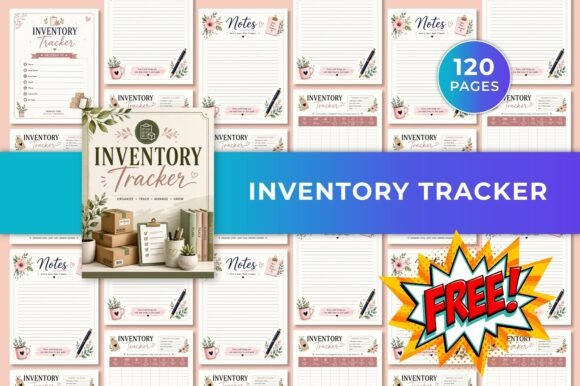
At its core, the Inventory Tracker KDP Graphic is a 120-page Canva template designed to be printed or used digitally. It includes inventory tracking pages, product information logs, stock level monitoring sections, low stock alerts, reorder quantity records, supplier information pages, and notes pages. Because it comes as a fully editable Canva template, you can adjust fonts, colors, and layout to match your brand or personal preference before printing. The final output is a US Letter size, CMYK color, no-bleed PDF or high-quality JPG file.
What makes this product distinct is its blend of structure and flexibility. You are not locked into a pre-printed notebook with rigid categories. Instead, you can customize column headers, add your logo, or change the color scheme to differentiate between product lines. This level of personalization is rare in off-the-shelf paper inventory logs and gives the Inventory Tracker KDP Graphic an edge for businesses that want a consistent visual identity across their operational documents.
Comparison with Common Inventory Tracking Methods
To understand where this tracker fits, it helps to compare it with the main alternatives: generic spreadsheets, dedicated inventory software, and standard paper logs. Each approach carries distinct tradeoffs in cost, effort, scalability, and usability.
Spreadsheets vs. the Inventory Tracker KDP Graphic
Many small businesses begin with Microsoft Excel or Google Sheets. Spreadsheets are highly flexible, can handle formulas for reorder points, and are essentially free if you already have the software. However, they require you to design your own layout, enforce data entry consistency, and maintain formatting over time. A spreadsheet can quickly become unwieldy if you manage hundreds of SKUs or need to track multiple suppliers across different product categories.
The Inventory Tracker KDP Graphic removes the design burden. You get a pre-structured log with dedicated sections for product details, stock levels, low-stock alerts, and supplier information. For someone who prefers a paper-based or hybrid workflow, this saves hours of setup time. On the downside, a static PDF or printed sheet lacks the automatic calculations and conditional formatting that a well-built spreadsheet offers. If you rely on real-time inventory value computations or dynamic reorder alerts, a spreadsheet may still be more practical.
Dedicated Inventory Software vs. a Printable Tracker
Software solutions like Zoho Inventory, QuickBooks Commerce, or even simpler tools like Sortly provide real-time updates, barcode scanning, multi-location support, and integration with sales channels. For businesses with high transaction volumes or multiple sales platforms, these features are hard to beat. However, they come with learning curves, monthly fees, and often more functionality than a sole proprietor needs.
The Inventory Tracker KDP Graphic competes on simplicity and cost. For a one-time purchase, you get a complete system that requires no subscription, no internet connection, and no training. This makes it especially attractive for micro-businesses, side hustles, or operations where inventory moves slowly. The tradeoff is that you lose real-time accuracy, automated reorder triggers, and the ability to share live data across a team. If you have employees pulling stock from a single warehouse, a paper system can lead to version conflicts and delayed updates.
Standard Paper Logs vs. the Customizable Template
Basic paper inventory notebooks are available in office supply stores. They offer a simple grid for recording stock counts but rarely include dedicated sections for supplier details, reorder quantities, or low-stock alerts. Most are generic and cannot be customized. The Inventory Tracker KDP Graphic fills this gap by providing specialized pages that mirror the structure of a professional inventory management system, all within a printable format.
The ability to edit the template before printing is the key differentiator. You can add extra columns for batch numbers, expiration dates, or storage locations unique to your business. A standard paper log forces you to adapt your workflow to its layout; this template adapts to your workflow. For businesses with specialized inventory needs—such as handmade goods with varying raw material lead times—this flexibility is valuable.
Strengths and Best-Fit Situations
The Inventory Tracker KDP Graphic shines in scenarios where simplicity, low cost, and customization matter more than real-time automation. Here are some situations where it is likely the right choice:
- Single-person operations: If you are the only person tracking and fulfilling inventory, a printed or digital PDF tracker can be sufficient. You can keep a binder on your desk and update it as you receive shipments or fulfill orders.
- Low-volume or slow-moving inventory: Businesses with fewer than 100 SKUs or products that turn over slowly (e.g., specialty crafts, vintage goods, or durable equipment) do not need constant updates. A weekly or monthly manual check works well.
- Brand-conscious sellers: If you sell on Etsy, Amazon Handmade, or through your own website, maintaining a consistent brand aesthetic across all customer-facing and operational documents can be a priority. The editable Canva template lets you incorporate your logo, brand colors, and fonts.
- Hybrid digital-print workflows: Some users prefer to fill in the PDF on a tablet using a stylus and store it in cloud storage. This approach gives you a searchable, portable record without the clutter of a physical binder, while still offering the structure of a purpose-built form.
- Budget-conscious startups: When every dollar counts, a one-time template purchase avoids recurring software subscription fees. You can print as many copies as you need or reuse the same digital file forever.
Limitations and When to Consider Alternatives
No single tool fits every situation, and the Inventory Tracker KDP Graphic has clear limitations that may push some users toward other solutions.
Team collaboration: If multiple people need to update inventory simultaneously, a paper or static PDF system creates data silos. One person's update may overwrite another's, or the physical binder may be in a different location. In this case, a cloud-based spreadsheet with version history or dedicated inventory software with role-based permissions is more reliable.
High transaction volume: Businesses processing dozens of orders daily will find manual entry tedious and error-prone. Automated systems that sync with your point-of-sale or e-commerce platform reduce mistakes and save time. For a busy retail store or active online shop, a manual tracker becomes a bottleneck.
Multi-location inventory: If you stock products across multiple warehouses, retail locations, or pop-up shops, a single paper ledger cannot easily track movement between sites. Software that supports location-based inventory is better suited to this complexity.
Need for analytics and reporting: The template provides structured logs, but it does not generate turnover ratios, dead stock reports, or demand forecasting. If you rely on data insights to make purchasing decisions, a spreadsheet with pivot tables or a software dashboard will give you more value.
Practical Decision Factors
When evaluating whether the Inventory Tracker KDP Graphic is right for you, consider the following:
- Inventory complexity: How many SKUs do you manage? How many suppliers? The template's 120 pages offer room for hundreds of entries, but if you have thousands of products, you may need a digital database.
- Update frequency: How often do you need to record stock changes? Daily updates favor a digital system; weekly or monthly checks are manageable on paper.
- Tech comfort level: Canva is user-friendly, but you need basic familiarity with drag-and-drop editing. If you prefer not to customize, a simpler printable PDF or a pre-printed notebook may save time.
- Growth trajectory: A manual system can work for a startup, but if you plan to scale rapidly, investing in digital infrastructure early may reduce growing pains later. The template can serve as a transitional tool while you evaluate more advanced options.
Realistic Example: How the Tracker Might Be Used
Imagine a soap maker who sells through Etsy and at local markets. She has about 60 product variations (different scents, sizes, and bundle packs) and sources oils, fragrances, and packaging from four suppliers. Each month, she receives new materials and tracks how many finished units are in storage. She prints the Inventory Tracker KDP Graphic, customizes the header with her shop name, and uses the product information pages to log batch numbers and ingredient costs. The low-stock alert section helps her reorder lavender oil before she runs out during peak season. She keeps the binder in her workshop and updates it every Saturday morning. For her volume and workflow, the paper system is efficient, affordable, and perfectly adequate.
Now consider a vintage clothing seller on Depop and Instagram who sources new items weekly, photographs and lists them immediately, and ships within 24 hours. With inventory changing constantly and items selling within hours, a paper log would be outdated before the ink dries. This seller would benefit more from a mobile app with barcode scanning that updates stock levels in real time across multiple sales channels.
Final Considerations
The Inventory Tracker KDP Graphic occupies a useful niche for small-scale, low-complexity inventory management. Its main strength is that it combines the structure of a professional inventory system with the flexibility of a customizable template, all at a one-time cost. For solopreneurs, slow-moving product lines, and brand-conscious sellers who prefer a tangible record, it offers a practical middle path between a plain notebook and a full digital platform.
However, it is not a substitute for automated inventory software when you need real-time accuracy, team collaboration, or advanced analytics. The best approach is to honestly assess your current volume, growth plans, and tolerance for manual data entry. If your operation is small and likely to stay that way, the editable template is a cost-effective and visually coherent solution. If you anticipate rapid scaling or already struggle to keep up with stock updates, investing in a digital system now may save you from future headaches.
Ultimately, the right inventory tracker is the one you will actually use consistently. The Inventory Tracker KDP Graphic makes that consistency easier to achieve for many small business owners, but your specific needs should always guide the final choice.