Daily Work Distribution Planner for KDP Success
When you spend hours juggling tasks, jumping between projects, and losing track of where your time actually goes, the Daily Work Distribution Planner, KDP offers a straightforward way to regain control. This isn’t just another empty grid. It’s a deliberately designed tool that helps you see your workload clearly, assign time intelligently, and produce consistent results without the mental clutter. The version ready for Amazon KDP comes with three distinct layouts, each built to match different working styles, making it a versatile asset for anyone who manages people, projects, or their own daily output.
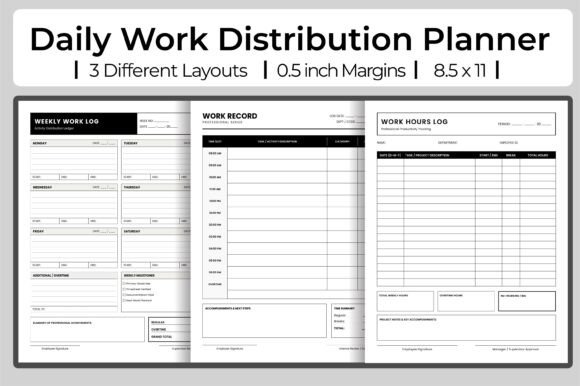
The three-Layout approach is what sets this planner apart. Instead of forcing you into one rigid format, the Daily Work Distribution Planner, KDP gives you options. You might prefer a structured hourly breakdown for client-facing work. Another day, a flexible priority matrix suits your creative flow better. Or perhaps a simple task list with time estimates keeps you moving without overthinking. Having all three inside a single 120-page PDF—or spread across three separate 120-page PDFs—means you can print exactly what fits your rhythm. Each file prints cleanly at 300 dpi, sized perfectly at 8.5″ x 11″ without bleed, which makes uploading to KDP effortless and guarantees a professional interior.
Why Three Layouts Matter for Real Productivity
Different kinds of work demand different kinds of planning. A designer mapping out a brand identity needs space for iteration, notes, and visual thinking. A freelancer juggling multiple clients needs clear time blocks to prevent overbooking. A small business owner coordinating a team needs a layout that shows who does what, when, and for how long. The Daily Work Distribution Planner, KDP answers each of these needs without asking you to adapt to a single generic template.
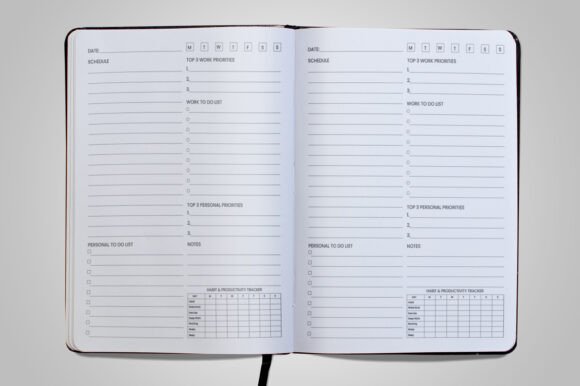
- Layout one is ideal for detailed scheduling. It breaks the day into hourly or half-hourly slots, making it perfect for meeting-heavy roles or anyone tracking billable hours. You can see at a glance where every minute goes.
- Layout two focuses on task grouping by energy level or priority. This suits creative professionals who need to batch deep work in the morning and leave lighter tasks for the afternoon. It encourages intentional distribution rather than reactive scheduling.
- Layout three is a hybrid that combines a task list with a simple time log. This works well for entrepreneurs and educators who need a quick capture system without elaborate formatting. It keeps your day visible without overwhelming you with detail.
Rotating between these three layouts across a week or month prevents the planning fatigue that often comes with using the same template day after day. Your brain stays engaged because the format changes slightly, and each layout highlights a different aspect of how you spend your energy.
Creative Applications Across Different Roles
The Daily Work Distribution Planner, KDP isn’t limited to standard office use. Its flexibility invites creative adaptation. Here are several ways different users can make it their own.
For Freelancers and Independent Creators
If you’re a writer, designer, photographer, or developer, your income depends on how well you allocate time across projects. Use the hourly layout to block out focused creation time, client communication, and admin work. Then use the priority layout to rank your top three deliverables each day. Over time, this reveals patterns: maybe you consistently underestimate how long editing takes, or you spend too many mornings on email. Adjust your distribution accordingly. The three PDFs can be printed separately—one for client work, one for personal projects, one for learning or skill-building—keeping each area organized in its own volume.
For Small Business Owners and Team Leads
Distribution isn’t just about your own tasks. When you oversee others, the planner becomes a lightweight tool for resource planning. Use the hybrid layout to assign tasks to team members, note estimated hours, and track actual time spent. The 120-page length gives you a full quarter of daily tracking per file. You can keep one file for operations, one for project management, and one for strategic planning. The clean, no-bleed design prints beautifully on standard paper, so you can pin pages to a wall or keep them in a binder without losing margin content.
For Educators and Workshop Leaders
Teachers, tutors, and trainers deal with multiple classes, preparation time, and grading. The Daily Work Distribution Planner, KDP offers a way to visually distribute your day across instructional time, lesson planning, and administrative duties. The priority layout helps you ensure grading doesn’t crowd out curriculum development. You can also adapt the planner for student use: hand out a printed page as a time management exercise or include it in course materials. Because each PDF is ready to upload, you could even publish a customized version for your specific educational audience on KDP.
For Marketers and Content Creators
Consistency is the foundation of effective content marketing. Use the hourly layout to schedule writing, editing, graphic creation, and publishing across different platforms. The task grouping layout works well for batching content themes: one day for blog posts, another for social media, another for analytics review. With three separate PDFs, you can dedicate one file to content planning, one to campaign tracking, and one to client deliverables. The 300 dpi resolution ensures that any printed or exported pages remain sharp, even when you scan handwritten notes back into your digital workflow.
Keeping Your Results Clear and Consistent
No matter which layout you choose, the Daily Work Distribution Planner, KDP rewards consistency. These small habits will help you get the most out of the system:
- Fill in your non-negotiable time first. Whether it’s meetings, school pickup, or a recurring creative session, block these slots before anything else. This prevents overcommitment before you even start.
- Use one layout per week. Switching formats daily can feel chaotic. Instead, commit to one layout for an entire week, then rotate. This gives you enough data to evaluate whether that structure serves your current workload.
- Review your distribution weekly. Spend five minutes looking back at completed pages. Which tasks took longer than expected? Where did you have unused gaps? That reflection turns a simple log into a strategic improvement tool.
- Pair the planner with a monthly overview. The daily pages handle execution, but a companion monthly view helps you spot larger trends. Consider using one of the three PDFs as your monthly or quarterly planning volume, reserving the other two for daily logs.
Adapting the Planner for Different Audiences and Platforms
One of the strongest features of the Daily Work Distribution Planner, KDP is its adaptability for publication. Because the files are high resolution, print-ready, and sized perfectly for Amazon KDP’s interior specifications, you can take the base design and tailor it to a niche audience without rebuilding from scratch. For example:
- For busy parents: Rename the time blocks to reflect morning routine, work hours, family time, and personal projects. The three layouts accommodate the unpredictable nature of parenting while still keeping you grounded.
- For remote workers: Add columns for communication channels, focus sessions, and breaks. The hybrid layout works especially well here, letting you log both task completion and time spent in meetings versus solo work.
- For creative hobbyists: Use the priority layout to balance practice time, project work, and learning. A musician could track rehearsal, composition, and listening. A painter could log studio time, material prep, and gallery outreach.
Because the product includes three separate PDF files, you can publish them as a series—Volume 1 for daily planning, Volume 2 for weekly reflection, Volume 3 for project tracking—or as a single combined book with three sections. The lack of bleed simplifies the upload process, and the 8.5″ x 11″ size is standard for both print and digital use. If you’re building a KDP brand around productivity tools, this interior provides a solid foundation that you can iterate on across multiple titles.
Practical Recommendations for Long-Term Use
The Daily Work Distribution Planner, KDP works best when you treat it as a flexible framework rather than a rigid system. Here are a few recommendations based on my own experience using similar tools across different professional contexts.
Start with one layout and stick with it for two weeks. This gives you enough data to see what the format reveals about your habits. If you constantly leave the time blocks empty, the hourly layout might not match your rhythm. Switch to the priority or hybrid layout and try again. The goal is to find the format that feels natural enough to maintain, not the one that looks most impressive on paper.
Keep your completed pages. Don’t throw them away after the week ends. A stack of filled-in planners becomes a reference library. Six months from now, you can flip through and see exactly how you allocated time during a busy season, which projects took longer than expected, and where you found unexpected pockets of focus. That historical data is invaluable for future planning.
Customize the headers before printing. The design is clean and minimal, so you have room to write your own categories. Label columns with terms that matter to your work: “Deep Work,” “Admin,” “Meetings,” “Learning,” “Personal.” The more the layout reflects your actual vocabulary, the more useful it becomes.
Use the three PDFs for different time horizons. Print one file as your daily log, but repurpose another as a weekly overview and the third as a project tracker. This gives you a complete system from a single product, without needing to buy separate planners. The 120-page length per file supports this approach comfortably.
Why This Planner Fits a Professional Workflow
What makes the Daily Work Distribution Planner, KDP genuinely useful is that it prioritizes clarity over complexity. The layouts are designed to be filled out quickly, read at a glance, and reviewed with ease. There are no elaborate key systems, no color-coding requirements, no learning curve. You simply choose a layout, write in your tasks, and track your time. Over days and weeks, that simple action builds awareness of how you distribute your energy across all the demands on your attention.
For anyone publishing on Amazon KDP, having a ready-to-upload interior that requires no additional formatting is a time saver. The 300 dpi resolution ensures sharp text and clean lines, and the no-bleed specification means you don’t have to worry about trimming or margin errors. The three separate PDF files also give you the option to sell them individually, bundle them as a set, or offer one as a free lead magnet to build your audience. The flexibility is built into the product itself.
Whether you’re using the planner for your own daily organization or packaging it as a resource for your audience, the core value remains the same: it helps you see where your time goes and make intentional choices about where it should go next. That kind of clarity is rare in a world full of distractions, and a well-designed tool makes it easier to achieve.