Digital Workout Planner: A Practical Guide to Choosing the Right Fitness Tracking Tool
Staying consistent with fitness goals often comes down to how well you track your progress. Between juggling workout logs, meal plans, body measurements, and habit streaks, the right organizational system can make a real difference. The 💪 Digital Workout Planner has emerged as one option among many for those who prefer a structured, interactive approach to fitness planning. But how do you know if it fits your needs, and what should you consider when comparing it to alternatives like paper journals, simple note apps, or other digital planners?
This article explores what makes the 💪 Digital Workout Planner distinct, where it excels, where it may fall short, and how to decide whether it or another approach is the right fit for your lifestyle and goals.
What Is the 💪 Digital Workout Planner?
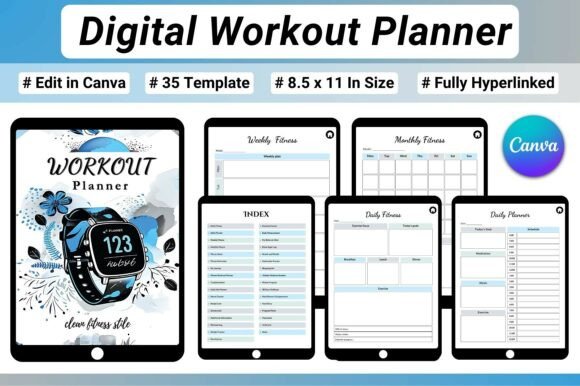
At its core, the 💪 Digital Workout Planner is a 35-page, hyperlinked PDF designed to be used on devices like tablets, iPads, or laptops. It is built around Canva, which means you can edit the templates directly in a browser or the Canva app. The planner covers a wide range of fitness and wellness tracking needs: daily and weekly workout planning, monthly calendars, exercise logs with rep and set tracking, running logs, body measurement charts, before-and-after progress photo pages, goal-setting worksheets, habit trackers, 30-day challenge pages, and motivational reward planning.
The standout feature is the hyperlinked index. Instead of scrolling through dozens of pages manually, you can tap a link in the table of contents to jump directly to the section you need. This makes navigation smooth and fast, especially during a workout when you don't want to waste time flipping pages.
How Does It Compare to Other Fitness Tracking Options?
To evaluate the 💪 Digital Workout Planner fairly, it helps to look at the broader landscape of fitness planning tools. People typically fall into one of several camps: paper planners and journals, general-purpose digital notes (like Notion, Evernote, or Google Docs), dedicated fitness apps (like MyFitnessPal, Strong, or Fitbod), or customizable digital planners like this one.
Versus Paper Planners and Journals
Paper planners have a tactile appeal that many people love. Writing by hand can feel more intentional, and there is no screen time involved. However, paper lacks flexibility. If you need to change a layout, add extra pages, or erase mistakes, you are stuck with what you wrote. The 💪 Digital Workout Planner solves this by being fully editable in Canva. You can resize text boxes, change colors, duplicate pages for extra weeks, or delete sections you do not need. The hyperlinked navigation also gives it an edge over paper, where flipping back and forth between a monthly calendar and a daily log takes more effort.
That said, paper requires no battery, no device, and no software subscription. For someone who prefers analog methods or wants to avoid screens entirely, a paper journal remains a solid choice.
Versus General-Purpose Digital Notes
Apps like Notion or OneNote are extremely powerful for creating custom fitness dashboards. You can build your own workout log, measurement tracker, and goal system from scratch. The tradeoff is setup time. Building a well-organized fitness system in Notion can take hours, and you need to maintain it yourself. The 💪 Digital Workout Planner offers a ready-made structure. You open it, edit your name and goals, and start tracking immediately. For people who want a polished system without the DIY effort, this is a major advantage.
On the other hand, general note apps are more flexible for integrating other parts of your life, like meal prep recipes, reading notes, or work tasks. If you prefer having everything in one ecosystem rather than a dedicated fitness planner, that might be a better fit.
Versus Dedicated Fitness Apps
Apps like Strong, Fitbod, or MyFitnessPal are designed specifically for logging workouts and nutrition. They often include exercise libraries, automatic rest timers, and progress charts that update in real time. They also sync with wearable devices. The 💪 Digital Workout Planner does not have these automated features. You log your reps, sets, and weights manually, and you calculate your own progress. For someone who wants the convenience of a smart app that does the math and suggests workouts, a dedicated fitness app may be more appealing.
However, those apps often lock you into a specific structure. If you want to track things beyond standard gym workouts, such as mobility work, outdoor running, or body measurements, you may hit limitations. The 💪 Digital Workout Planner gives you more freedom to customize what you track and how you view your progress. It also includes wellness and habit elements that many workout-only apps neglect.
Strengths of the 💪 Digital Workout Planner
After comparing categories, it is worth highlighting where this planner truly shines. First, the 💪 Digital Workout Planner is highly visual. The Canva editing allows you to use your own color scheme, add photos, and design a layout that feels personal. For people who are motivated by aesthetics, this can make the planning process more enjoyable and sustainable.
Second, the hyperlinked navigation is a practical advantage. In a paper planner, you might have a bookmark or sticky note to mark your current page. In a digital planner with links, you can jump from your monthly overview to your daily log to your body measurement chart in one tap. This is especially useful during a workout when you want to log an exercise quickly and move on.
Third, the planner includes features that many alternatives overlook. The before-and-after progress photo pages, the 30-day challenge sheets, and the reward planning section help address the motivational side of fitness. Sticking with a routine is often more about mindset than mechanics, and having dedicated space for reflection and celebration can support long-term consistency.
Fourth, it is a one-time purchase, not a subscription. Many fitness apps charge monthly or yearly fees. Once you buy the 💪 Digital Workout Planner, you can use it indefinitely, edit it as much as you want, and re-download it if needed.
Tradeoffs and Limitations to Consider
No tool is perfect for everyone, and the 💪 Digital Workout Planner has its limitations. The most obvious is that it requires a device and the Canva app. If you prefer to train without a tablet or phone, or if you do not want to be tied to Canva's editing environment, this planner may not suit your workflow. You also need a basic comfort level with digital editing. While Canva is user-friendly, it is still a step above simply writing on a printed page.
Another tradeoff is the lack of automation. Unlike fitness apps that automatically calculate your total volume, track your personal records, or suggest weight increases, this planner relies on you to do the math and analysis. For someone who wants data-driven insights without manual work, a dedicated app is more efficient.
There is also the question of longevity. Digital planners can become outdated if you change devices or if Canva updates its platform. A paper journal will work the same way in ten years. And a local file on your device may be lost if you do not back it up. These are minor risks, but worth keeping in mind.
When Is the 💪 Digital Workout Planner the Right Choice?
Based on the comparisons above, the 💪 Digital Workout Planner is best suited for certain scenarios. If you are someone who enjoys planning as part of the fitness process, who likes having a beautiful, personalized layout, and who wants to track multiple dimensions of wellness beyond just workouts, this planner is a strong contender. It works well for people who use a tablet or iPad regularly and who want a single file that organizes their entire fitness life.
It is also a good fit for beginners who are still figuring out their routine. The guided sections for goal-setting, habit tracking, and reflections can help build structure without overwhelming you. The 30-day challenge pages are especially useful for someone starting a new habit and wanting to see quick progress.
For intermediate or advanced fitness enthusiasts, the planner offers enough space to log detailed workout data and track body changes over time. The flexibility in Canva means you can adapt the templates to match your specific training style, whether that is powerlifting, running, yoga, or a mix of activities.
When Might You Need a Different Option?
If automation and data analysis are priorities, a dedicated fitness app will serve you better. If you want to avoid screens entirely, a paper journal is the simpler path. If you need a single tool that integrates fitness, nutrition, and other life areas, a platform like Notion might give you more control. And if you are already deep into an app ecosystem with a smartwatch or heart rate monitor, syncing data automatically is a convenience that the 💪 Digital Workout Planner cannot offer.
There is also the consideration of collaboration. If you work with a coach or training partner who needs access to your logs, sharing a Canva file is possible but less seamless than a shared app or Google Sheet. Similarly, if you want to track progress alongside a community or within a structured program, the planner is a solo tool.
Practical Decision Factors
To help you decide, here are a few questions to ask yourself:
- Do you enjoy designing and customizing your own planning system, or do you prefer something that works out of the box?
- How important is it to have automatic calculations and progress charts?
- Will you realistically bring a tablet or phone to your workouts?
- Do you want to track only workouts, or also body measurements, habits, meals, and motivational goals?
- Are you looking for a one-time cost rather than a recurring subscription?
If you lean toward customization, manual tracking, and a holistic view of wellness, the 💪 Digital Workout Planner is worth considering. If you lean toward automation, simplicity, or a device-free approach, another tool may fit better.
Making the Most of a Digital Planner
If you decide to go with a digital planner like this one, a few practices can improve your experience. Set aside a few minutes each week to update your pages. Consistency matters more than perfection. Use the hyperlinked index to navigate quickly during workouts, and consider creating a template page for your most common workout days so you can duplicate them. The before-and-after photo pages are especially powerful if you commit to taking photos under consistent lighting and angles every few weeks.
Also, remember that a planner is only a tool. The real results come from showing up, pushing yourself appropriately, and recovering well. The 💪 Digital Workout Planner can help organize and motivate that process, but it does not replace the work itself.
Final Thoughts
Choosing a fitness tracking tool is a personal decision that depends on your habits, preferences, and goals. The 💪 Digital Workout Planner stands out for its visual design, hyperlinked navigation, and all-in-one coverage of workouts, body tracking, habits, and motivation. It compares favorably to paper planners in flexibility, to general note apps in ease of setup, and to dedicated fitness apps in breadth of tracking. At the same time, it requires a device and manual effort, and it lacks the automation of smart apps.
By understanding these tradeoffs, you can make a more informed choice that supports your long-term consistency and satisfaction. The best system is the one you actually use. Whether that is a digital planner, a paper journal, or a fitness app, the key is finding a method that keeps you engaged and moving forward.