Etsy Seller Planner KDP: A Practical Tool for Organizing and Scaling Your Etsy Business
Running an Etsy shop involves juggling product research, SEO optimization, inventory management, marketing, and financial tracking—often all at once. For sellers who want a structured approach to these tasks, the Etsy Seller Planner KDP offers a complete business planning system. Designed as a fully editable Canva template, this 30-page planner aims to bring clarity and consistency to shop management, from goal setting to growth review. Below, we examine its features, practical value, and who stands to benefit most from using it.
What Is the Etsy Seller Planner KDP?
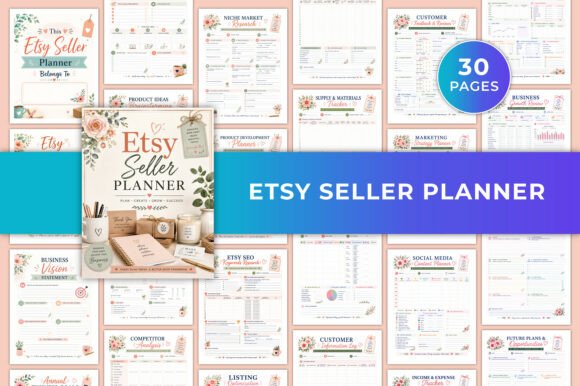
The Etsy Seller Planner KDP is a digital planner tailored specifically for Etsy sellers. It comes as a Canva template that you can customize with your own fonts, colors, and layout preferences, then export as a printable PDF. The planner covers the full cycle of running an Etsy business: planning, product development, listing optimization, order fulfillment, marketing, and financial tracking. Its 30 pages are organized into distinct sections, each addressing a core area of shop management.
What sets this planner apart from generic business planners is its focus on Etsy-specific workflows. The inclusion of SEO keyword trackers, listing optimization checklists, and competitor niche analysis pages reflects the unique needs of marketplace sellers. Rather than offering vague prompts, the template provides structured fields that guide you through practical tasks like researching product ideas, tracking inventory, and logging customer reviews.
Comprehensive Shop Organization
The planner begins with sections for shop information and business vision, then moves into annual and monthly goal planning. This top-down structure helps you align daily tasks with larger objectives. For example, you can set a monthly sales target and then use the product ideas and research pages to identify new listings that support that goal. The annual goal page is useful for mapping out seasonal strategies, such as planning for Q4 holiday demand or launching a new product line.
SEO and Listing Optimization Tools
One of the most valuable sections for any Etsy seller is the SEO keywords and tags tracker. Here, you can record keyword ideas, search volumes, and the tags you use for each listing. Combined with the listing optimization checklist, this section encourages a systematic approach to improving search visibility. In practice, you might use the tracker to test different keyword combinations and note which ones drive traffic, then refine your titles and tags accordingly. The competitor and niche market analysis pages complement this by helping you understand what others in your category are doing—an essential step for differentiation.
Inventory and Order Management
The inventory and supply tracker provides a straightforward way to monitor stock levels, reorder points, and supplier details. For sellers who manage multiple products or raw materials, this reduces the risk of running out of popular items. The order and shipping tracker allows you to log customer orders, shipping dates, and tracking numbers in one place. While this might duplicate what Etsy’s own dashboard offers, having a physical or offline record can be helpful for sellers who want a quick overview without logging in, or who sell across multiple platforms.
Marketing and Social Media Planning
The marketing and social media planner pages are designed to help you schedule promotions, track campaign performance, and plan content. If you use platforms like Instagram, Pinterest, or Facebook to drive traffic to your Etsy shop, these pages let you map out posts, note engagement metrics, and evaluate which channels yield the best return. The customer information and reviews log is another practical addition—it allows you to record feedback, identify repeat buyers, and spot trends in customer preferences.
Financial Tracking and Business Review
The income, expense, and sales tracking section is structured for monthly use. You can log revenue, fees, material costs, and other expenses, then calculate profit margins. Over time, this data supports informed decisions about pricing, product focus, and budget allocation. The business growth review and notes pages at the end of the planner provide space for reflection: what worked, what didn’t, and what adjustments to make in the coming month or quarter.
Usability and Flexibility
Because the planner is delivered as a Canva template, customization is straightforward. You can change font styles, adjust colors to match your branding, add or remove pages, and rearrange the order of sections. This flexibility is a significant strength—some sellers may want to print the planner and use it as a physical workbook, while others may prefer to fill it out digitally on a tablet or laptop. The US Letter size (8.5 × 11 inches) works well for both printing and screen use.
The template’s layout is clean and professional, with enough structure to guide you without feeling rigid. Fields are clearly labeled, and spacing is adequate for handwriting if you choose to print. For those new to Etsy selling, the planner essentially provides a ready-made workflow—you can follow the sections in order and gradually build a complete business record. For experienced sellers, it offers a way to consolidate scattered notes and spreadsheets into one coherent system.
Strengths and Real-World Performance
In real-world use, the Etsy Seller Planner KDP performs well as a organizational tool. Its strength lies in covering the full spectrum of shop management within a single document. Sellers who consistently use the keyword tracker and listing checklist often report improved search rankings over time, simply because they are forced to think strategically about SEO rather than relying on guesswork. The financial tracking pages, when used monthly, provide clear visibility into profitability—something many sellers overlook when focusing only on sales volume.
The competitor analysis section is another practical asset. By recording competitor pricing, keywords, and product features, you can identify gaps in your own offerings. For example, if you notice that top-selling competitors use specific keywords you haven’t tried, you can test those in your next listing update. This kind of structured comparison is more effective than occasional browsing because it creates a record you can refer back to.
Who Benefits Most
This planner is best suited for Etsy sellers who want a centralized system for managing their business. It is particularly useful for:
- New sellers who need guidance on what to track and how to organize their workflow. The step-by-step structure helps build good habits from the start.
- Part-time or side-hustle sellers who have limited time and need an efficient way to stay on top of tasks without spreadsheets or complex software.
- Sellers scaling their shop who are adding products, exploring new niches, or increasing marketing efforts. The growth review section supports strategic planning as the business expands.
- Creators who prefer analog or hybrid workflows—if you like writing things down or want a printable reference, this template works well both digitally and on paper.
Limitations and Considerations
No tool is without limitations. Because the planner is a fixed 30-page template, sellers with very large inventories may find the product research and tracking pages insufficient. You could duplicate pages in Canva to add more space, but that requires extra effort. Additionally, the planner does not include built-in formulas or automatic calculations—financial tracking is manual. For sellers who prefer automated bookkeeping or integration with accounting software, this may feel like a step backward.
Another consideration is that the planner focuses on Etsy operations specifically. If you also sell on other marketplaces like Amazon Handmade or eBay, you would need to adapt the sections or maintain separate records. The template’s Etsy-centric design is a strength for focused sellers, but a limitation for multi-channel businesses.
Finally, as a digital product, success depends on consistent use. A planner is only as effective as the effort you put into filling it out. Skipping sections or using it sporadically reduces its value. For those who already have a well-established system, the planner may feel redundant—but for anyone seeking more structure, it offers a solid framework.
Long-Term Value and Recommendations
The Etsy Seller Planner KDP provides lasting value primarily through its reusable format. Because it is a Canva template, you can reset it each month or year and continue using the same structure. The business review pages encourage periodic reflection, which is essential for growth. Over several months, the accumulated records become a reference for what works in your shop—which products perform best, which keywords drive traffic, and which marketing channels are most effective.
For the price point of a typical digital planner, the depth and breadth of sections make it a practical investment for serious Etsy sellers. It replaces the need for multiple notebooks or scattered digital files, and its customization options ensure it can adapt to your specific branding and workflow preferences. If you are looking for a straightforward, complete system to manage your Etsy shop with less chaos and more clarity, this planner is worth considering.
To get the most out of it, set aside time at the start of each month to update the relevant pages—goal progress, sales, expenses, and marketing activities. Pair it with a quick weekly review of your keyword tracker and competitor notes. Over time, this consistent practice will give you a clearer picture of your business health and help you make more informed decisions about where to focus your energy.