1200 Shopify Automation Ideas
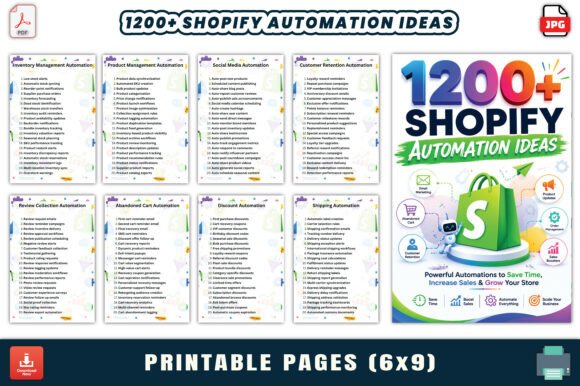
Running an ecommerce store means juggling a dozen tasks at once. Orders come in, customers ask questions, inventory needs updating, and email campaigns need to go out. It is easy to feel stretched thin. 1200 Shopify Automation Ideas offers a practical solution: a 62-page workbook filled with over a thousand automation concepts organized by category. Whether you run a small shop, manage multiple stores, or consult for clients, this resource gives you a structured way to streamline operations and reclaim hours each week.
The workbook is clean and straightforward. Each page presents automation ideas in a no-nonsense layout that makes scanning quick. Categories are clearly labeled, and the 6 × 9 inch format works well for both digital reference and print. The included PDF, JPG, and PNG files mean you can pull ideas into presentations, client proposals, or internal documentation without extra formatting work. The design feels professional but not flashy—it is built for action, not decoration.
What Makes This Workbook Different
There is plenty of generic advice about automation out there. What sets 1200 Shopify Automation Ideas apart is its breadth and specificity. Instead of a handful of tips, you get 1,240 separate ideas spanning 20-plus categories. That level of detail matters because every store has unique pain points. Maybe you need better cart recovery workflows. Perhaps inventory syncs are causing headaches. Or customer service responses are taking too long. This workbook covers all of that and more.
The categories include order processing, email marketing, inventory management, customer retention, social media, product management, shipping, discounts, cart recovery, upsell and cross-sell, loyalty programs, referral programs, analytics, subscriptions, SEO, CRM, and several others. Each category contains dozens of specific automation triggers, actions, and outcomes. You can browse the section most relevant to your current challenge or read through the entire workbook to build a comprehensive automation strategy.
Order Processing and Customer Service Automation
Order processing is where most stores lose time. Manual order verification, status updates, and fulfillment checks eat up hours. The workbook provides ideas for automating confirmation emails, fraud checks, order tagging, and fulfillment triggers. For customer service, think auto-replies based on keyword detection, ticket routing by issue type, and follow-up sequences after support interactions. These aren't theoretical concepts—they are ready-to-implement workflows you can adapt to your store's setup.
Email Marketing and Cart Recovery
Email marketing remains one of the highest ROI channels for ecommerce. The workbook includes automation ideas for welcome sequences, abandoned cart reminders, post-purchase follow-ups, replenishment reminders, and re-engagement campaigns. Cart recovery gets special attention with ideas for timing, discount triggers, and multi-channel follow-ups via email and SMS. The ideas are concrete enough to hand to a developer or implement yourself using popular automation tools.
Inventory and Product Management
Stockouts and overselling damage trust. The workbook offers automation ideas for low-stock alerts, supplier reorder triggers, product unpublishing when inventory hits zero, and bundle adjustments based on stock levels. Product management ideas include auto-generating meta descriptions, bulk variant updates, and scheduled publishing. These are practical ways to reduce manual overhead and keep your catalog accurate.
Who Benefits Most from This Resource
The workbook is designed for a wide audience. Entrepreneurs and solo store owners will find quick wins they can implement themselves without hiring a developer. Agencies and freelancers can use the ideas to build automation playbooks for clients, saving time and increasing the value of their services. Marketers and content creators will appreciate the email and social media categories, which include triggers for campaigns, posting schedules, and audience segmentation. Small business owners with limited technical skills can still extract plenty of actionable ideas because the workbook focuses on outcomes, not code.
The PLR license adds another layer of value. If you create content, sell digital products, or run a membership site, you can repurpose these ideas into blog posts, guides, checklists, or email courses. The commercial use rights mean you can integrate the content into your own offerings without starting from scratch. For publishers and bloggers covering ecommerce, this workbook serves as a reliable source of expert-level material.
How to Use the Workbook Effectively
Start by identifying your biggest bottleneck. Is it order fulfillment? Customer response time? Inventory accuracy? Flip to the relevant category and pick three to five ideas that feel achievable. Implement those first. Most automation ideas in this workbook follow a logical structure: trigger, action, outcome. That makes them easy to translate into workflows using tools like Shopify Flow, Zapier, or customer service platforms like Gorgias or Zendesk.
Another approach is to audit your current store operations. Write down every task you or your team perform repeatedly each day. Then cross-reference that list with the workbook's categories. You will likely find a matching automation idea for many of them. This turns an overwhelming topic into a step-by-step improvement plan.
The workbook also works well as a brainstorming tool. Sit down with your team or clients and go through each category. Discuss which ideas apply, which need modification, and which could be combined. Because the ideas are listed in a straightforward format, they serve as conversation starters rather than rigid prescriptions. You can adapt them to your specific products, audience, and tools.
Real-World Examples
Consider a common scenario: a store gets frequent customer inquiries about order status. The workbook suggests automating status updates via SMS or email at each step: confirmed, shipped, out for delivery, delivered. This reduces support tickets by giving customers the information they want without asking. Another example: a subscription store wants to reduce churn. The workbook includes ideas for pre-expiry reminders, personalized discount offers based on past orders, and feedback surveys triggered after cancellation. These address the root causes of churn rather than just reacting to it.
For upsell and cross-sell, the workbook covers product recommendations based on cart contents, post-purchase one-click upsells, and bundle discounts at checkout. These are proven revenue drivers that many stores leave on the table because they don't have a clear automation in place. The workbook removes that barrier by providing ready-made concepts you can configure in minutes.
Why Automation Matters for Growing Stores
As a store grows, manual processes become unsustainable. Hiring more people to handle tasks that could be automated eats into margins. Worse, human error increases with volume. Automated workflows are consistent, fast, and scalable. They free up you and your team to focus on strategy, product development, and customer relationships—areas where human judgment adds real value.
Automation also improves customer experience. Faster responses, accurate order updates, and personalized communication build trust. Customers notice when a store runs smoothly. They are more likely to return and recommend you to others. The workbook gives you a roadmap to deliver that experience without adding complexity to your daily operations.
The 1200 Shopify Automation Ideas workbook sits in a useful middle ground between generic advice and custom development. It is comprehensive enough to challenge experienced store owners while remaining accessible to beginners. The PLR license makes it a smart investment for anyone who creates content or builds products for the ecommerce space. If you are serious about running a more efficient Shopify store, this resource gives you a head start with hundreds of proven concepts you can put to work today.