Streamlining Classroom Management with the Digital Ultimate Teacher Organizer
Every educator knows the feeling—stacks of handwritten notes, scattered sticky reminders, printed calendars that overlap, and the quiet dread of missing a critical piece of information during parent-teacher conferences. The modern teaching environment demands more than just passion for the subject; it requires a system that holds together the hundreds of moving parts that make up a school year. That is where a well-structured digital tool changes everything. The Digital Ultimate Teacher Organizer offers a centralized, flexible approach to planning, record-keeping, and professional development. With its fully editable format, it bridges the gap between traditional paper planning and the convenience of digital access, giving teachers back the time they need to focus on what matters most.
Building the Foundation with Long-Term Planning Tools
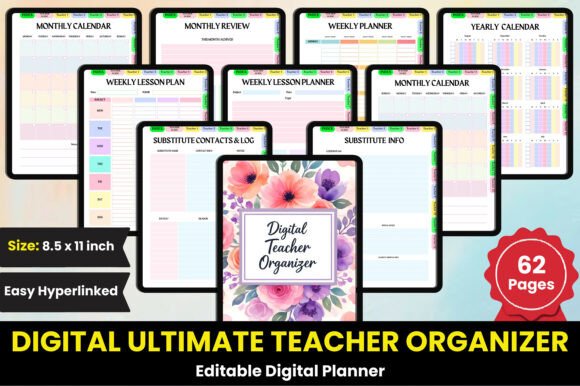
Before the first day of class, a teacher’s mind is already mapping out the entire academic year. The initial pages of this organizer are designed to capture that big-picture thinking. A dedicated Index helps users locate every section instantly, reducing the frustration of searching through dozens of tabs. Following the index, the Yearly Calendar appears across two unique layouts, offering both a traditional overview and an alternative grid for marking key dates such as term starts, holidays, and assessment windows. This dual-page approach means you can choose the format that matches your mental model of the year ahead.
Moving from the annual view into the Semester Overview and Semester Plan, the organizer encourages educators to break down broad goals into manageable chunks. The overview pages allow you to identify major units and exam periods, while the plan pages give space for specific learning objectives per subject. Whether you teach multiple grade levels or specialize in a single discipline, these sections provide the scaffolding to align your curriculum with school-wide benchmarks.
Mapping Weekly and Monthly Rhythms
After establishing semester goals, the natural next step is to zoom into monthly and weekly cycles. The Monthly Calendar is provided in two unique page designs—one for a clean, minimalist view and another with extra note space for reminders. Paired with the Monthly Review page, teachers can reflect on what worked, what needs adjustment, and how student progress aligns with planned outcomes. This reflective practice is often overlooked in paper planners, yet it is essential for responsive teaching.
For the day-to-day grind, the organizer features a Weekly Lesson Plan and Weekly Lesson Planner. These are not duplicate pages; the lesson plan focuses on specific subject content and standards, while the planner emphasizes time blocks, transitions, and resource management. Four unique Weekly Planner pages give you variety to switch between layouts as the term progresses—some weeks demand a detailed hour-by-hour grid, while others benefit from a simpler checklist format.
Daily Execution and Student-Centered Records
When the school day begins, the organizer shifts from planning mode to action mode. The Daily Planner provides space for the top priorities, appointments, and reminders. But teaching is rarely just about your own tasks. The Student Analysis pages allow you to record observations about learning styles, intervention needs, and growth areas for individual students. Combined with the Student Birthdays list and Parent Contacts log, you build a holistic picture of each child that supports differentiated instruction and meaningful communication with families.
Conference season can be particularly stressful without proper preparation. The Conference Notes section is designed to capture talking points, action items, and follow-up plans. When parents walk into a meeting, having a clear, organized record of their child’s progress—anchored by real data and observations—transforms the conversation from guesswork to collaboration. Similarly, the Parent Contacts log tracks every phone call, email, or meeting, ensuring that no communication falls through the cracks.
Managing the Classroom Ecosystem
A classroom is more than just students and lessons. Supplies, resources, and schedules all need tracking. The Classroom Inventory page is a simple but powerful tool for tracking textbooks, manipulatives, technology, and consumable materials. When you can see at a glance what is available and what needs replenishing, you reduce last-minute scrambles. The Classroom Volunteer log helps coordinate parent helpers, guest speakers, and field trip chaperones, while the Teacher Contact List keeps essential colleague information at your fingertips.
For those unexpected moments, the Substitute Contacts Log and Substitute Info pages are lifesavers. Nothing derails a classroom faster than an unprepared substitute. By keeping a dedicated section with class routines, behavior management notes, seating charts, and emergency procedures, you ensure that learning continues even in your absence. The Substitute Report page then lets the visiting teacher provide structured feedback about the day, so you can return with full context.
Attendance, Logistics, and Compliance
Tracking attendance accurately is a non-negotiable part of teaching, but it goes beyond just marking present or absent. The Tardy Log and Absence Log provide separate spaces for recording patterns. A student who is chronically tardy may need a different intervention than one who misses school due to illness. Having these logs in your organizer allows you to spot trends early and communicate with counselors or administrators with data in hand.
Medical information is another critical area that requires discretion and accuracy. The Medical Information page is designed to capture allergies, medications, emergency contacts, and special health plans. While this information is often kept in a school database, having a personal copy ensures you can act quickly during an emergency or field trip without relying on an internet connection.
Reading, Homework, and Goal Tracking
Literacy development is a priority in almost every classroom. The Reading List page lets you track books assigned or recommended, along with student progress and comprehension notes. For homework management, the My Homework Tracker is a simple but effective tool. Whether you use it for individual student tracking or for your own records of assignments given and collected, it reduces the chaos of missing work.
The Smart Goals section encourages you to set specific, measurable, achievable, relevant, and time-bound objectives for yourself and your students. This is not just a buzzword—having formal goals tied to your professional learning and student outcomes gives you a clear path for growth. Pair this with the Professional Learning pages, where you can record workshops, webinars, certifications, and reflections on continuing education.
Lesson Structures and Unit Flow
Planning at the lesson level requires both precision and flexibility. The Daily Lesson Plan pages are structured to include objectives, materials, procedure, differentiation, and assessment. Meanwhile, the Unit Plan and Unit Lesson Reflection pages allow you to step back and evaluate a complete set of lessons. The reflection page is especially valuable—after finishing a unit, you can document what students mastered, where they struggled, and what you would change next time. Over a few years, this collection of reflections becomes a personalized curriculum guide.
The Lesson Plan section (distinct from the daily lesson plan) provides a flexible canvas for sketching out ideas without the constraints of a rigid template. Sometimes creativity flows better with open space. The Weekly Timetable appears in multiple versions throughout the organizer, giving you different ways to visualize your week—block scheduling, rotating periods, or fixed time slots.
Term Planning and Resource Management
The Term Plan pages bridge the gap between semester goals and weekly execution. Here you can outline major assessments, projects, and events for each term. The Book List is another resource that supports curriculum planning, whether you are ordering class sets, building a classroom library, or tracking novels for literature circles.
If you work with multiple groups or subjects, the My Students section provides an at-a-glance roster with space for notes on each learner. This is different from the student analysis pages—it is a quick reference rather than a deep dive. Having both types of pages in one organizer means you can use the right tool for the right moment.
Professional Guidance and Customization
One of the standout features of this organizer is the Teacher Guide Section, which includes twelve Teacher Guide pages (Teacher Guide 1 through Teacher Guide 12). These pages serve as prompts, checklists, or reflection spaces tailored to different aspects of teaching. You might use them for documenting classroom management strategies, recording ideas from peer observations, or planning for professional development goals. The flexibility of having twelve dedicated spaces means you can adapt them as your needs evolve throughout the year.
The Helpful Hints page is a catch-all for insights you gather along the way—tips from colleagues, reminders about student preferences, or effective phrasing for difficult conversations. Over time, this page becomes a personalized teaching manual that reflects your real-world experience.
Editable Format and File Quality
All of these sections are delivered within an Editable Digital Ultimate Teacher Organizer Interior that you can customize using a free Canva account. The editing process is straightforward: you open the provided link, click on any text or element, and modify it to suit your school’s terminology, your preferred color scheme, or your specific schedule format. There is no need to install heavy software or learn complex design tools. This approach ensures that teachers of all tech comfort levels can tailor the organizer to their exact needs.
After editing, you have the option to export high-quality files in PDF, JPEG, or PNG formats. The PDF version is ideal for printing and binding into a physical planner, while the JPEG and PNG files work well for digital use on tablets, smartphones, or presentation displays. The resolution is suitable for both screen viewing and professional print, so you can share pages with colleagues or display them in your classroom without losing clarity.
Bringing It All Together
What makes the Digital Ultimate Teacher Organizer stand out is not just the sheer number of included pages—it is the thoughtful arrangement that follows the natural flow of a teacher’s year. Starting with big-picture calendars and ending with professional reflection guides, every section serves a practical purpose. The inclusion of multiple unique page designs for critical sections (calendar, weekly planner, monthly review) means you can choose what works best for your cognitive style without being locked into one template.
For a new teacher, this organizer provides a complete system that eliminates the guesswork of what to track. For a veteran educator, it offers a fresh, customizable structure that can replace fragmented paper systems or digital silos. The ability to edit everything in Canva means you are not stuck with someone else’s labels—you can rename “Student Analysis” to “Student Observations” if that fits your language better, or you can add your own sections by duplicating pages and adapting them.
The variety of logs—Tardy Log, Absence Log, Substitute Report, Parent Contacts, Conference Notes—ensures that you document the human side of teaching as thoroughly as the academic side. The Classroom Inventory and Book List address the logistical responsibilities that often consume planning time. And the Smart Goals and Professional Learning pages keep your own growth at the forefront, which is easy to neglect when you are focused entirely on students.
Ultimately, the goal of any teaching organizer is to reduce cognitive load. When you do not have to remember every detail because it is written down in a consistent, accessible format, you free up mental energy for the dynamic, unpredictable moments that define great teaching. The Digital Ultimate Teacher Organizer delivers on that promise by combining comprehensive content with genuine flexibility. Whether you are planning a semester, preparing for a substitute, or reflecting on a unit, the right page is already there—waiting for you to make it your own.